Custom Events Types
Using Custom Event Types
DonationScout allows you to create multiple event types to support different fundraising programs across your brand. Event types can be available to all locations, specific locations, or even a single event.
Understanding Event Types
Default Event Type
Your Default Event Type is the standard fundraising program offered by your locations. It defines the default fundraiser organizations see when submitting a request, including the donation percentage, available days, booking rules, and other event settings.
Custom Event Types
Custom Event Types allow you to offer additional fundraising programs without changing your standard fundraiser. When organizations search by ZIP code to book a fundraiser, any available custom event types are displayed alongside your Default Event Type as additional booking options. This allows you to promote special fundraising opportunities while continuing to offer your standard fundraiser.
Common uses for custom event types include:
- Creating a Specific Day Fundraiser (i.e. Mondays) with a higher donation percentage to increase traffic on slower nights.
- Offering a Back-to-School or Holiday Promotion for a limited time.
- Creating different fundraising programs for specific locations, regions or markets.
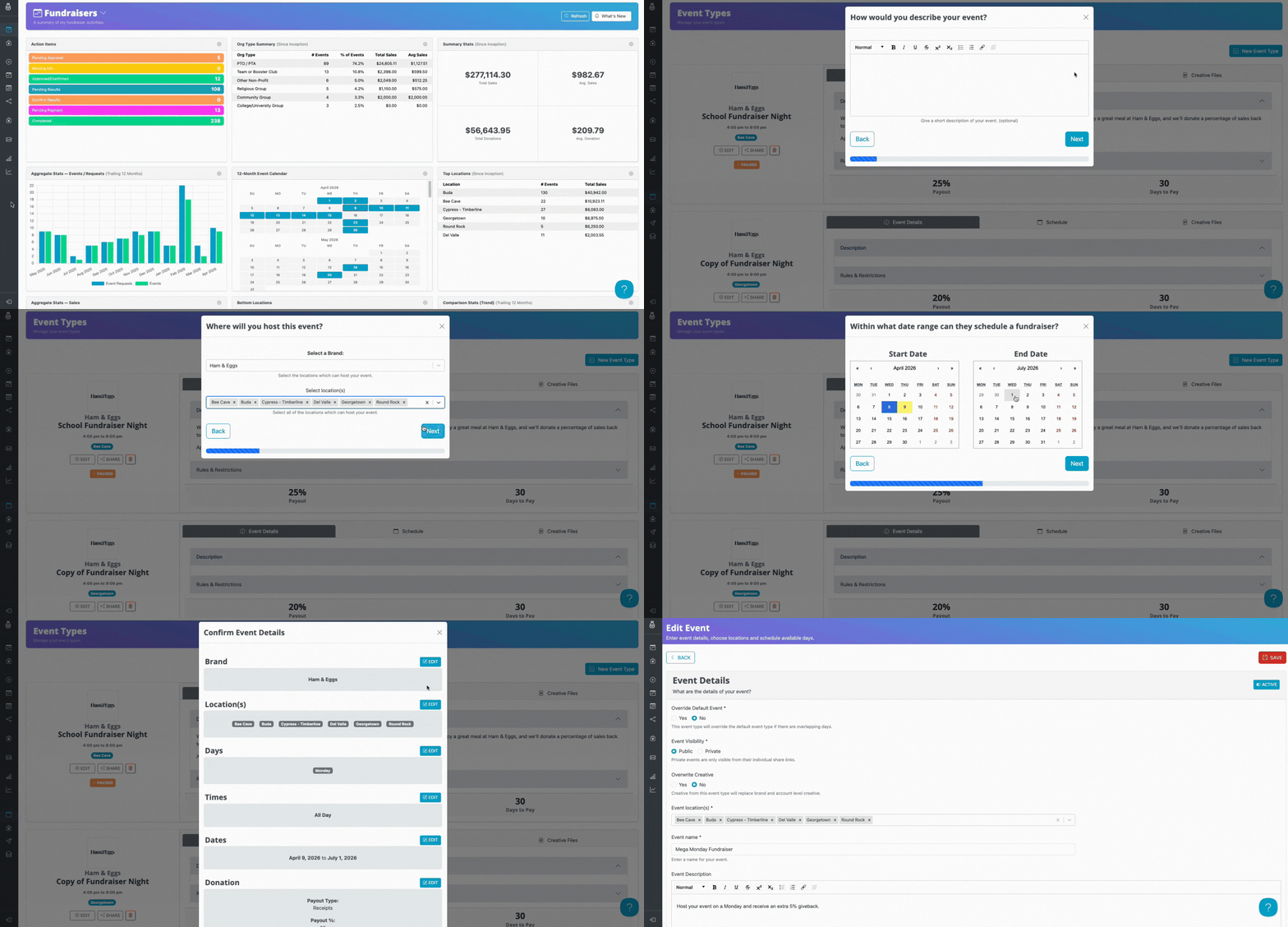
To create a custom event type:
- Navigate to Settings > Event Types.
- Click New Event Type in the upper-right corner.
- Follow the guided setup process to configure your event.
- Save the event type.
Once created, the new event type will be available to the locations assigned to it.
Private Event Types
A Private Event Type is only available when an organization has the unique URL and is not displayed as an option for organizations during the request process. This is useful for invitation-only fundraisers, special partnerships, or other fundraising programs that should not be publicly available.
Overriding the Default Event Type
When editing an event type, you can choose to Override Default.
Enabling Override Default replaces the default event type for the selected locations. Instead of seeing the brand's standard, default fundraising program, events for those locations will only see the customized event type and its settings.
This is useful when:
- A single location has different fundraiser availability.
- A market follows different operating hours or donation percentages.
- Certain locations participate in a regional promotion while the rest of the brand continues using the standard program.
For example, if most locations offer fundraisers Tuesday through Thursday, but one market only offers fundraisers on Mondays, you can create a custom event type for that market and enable Override Default so those locations follow their unique schedule without affecting the rest of the brand.
Managing Event Types
At any time, you can return to Settings > Event Types to edit, enable, disable, or update your event types as your fundraising programs evolve.